
Each site, with its own
Sites work with the group's plan and quotas, but their data and their team are their own. A branch is the same company; a subsidiary is another company in the group.
Sites and group
A main site manages its sites and subsidiaries, which keep their own data and their own team. You see the status of the whole group, share suppliers, policies and evidence without duplicating work, and assign access by site or region.
Why a group view
NIS2, DORA or ISO 27001 apply to the whole group, but the work is done at each site. Without a shared platform, suppliers are assessed twice, policies are copied by hand and management doesn't see the full risk picture.
Sites work with the group's plan and quotas, but their data and their team are their own. A branch is the same company; a subsidiary is another company in the group.
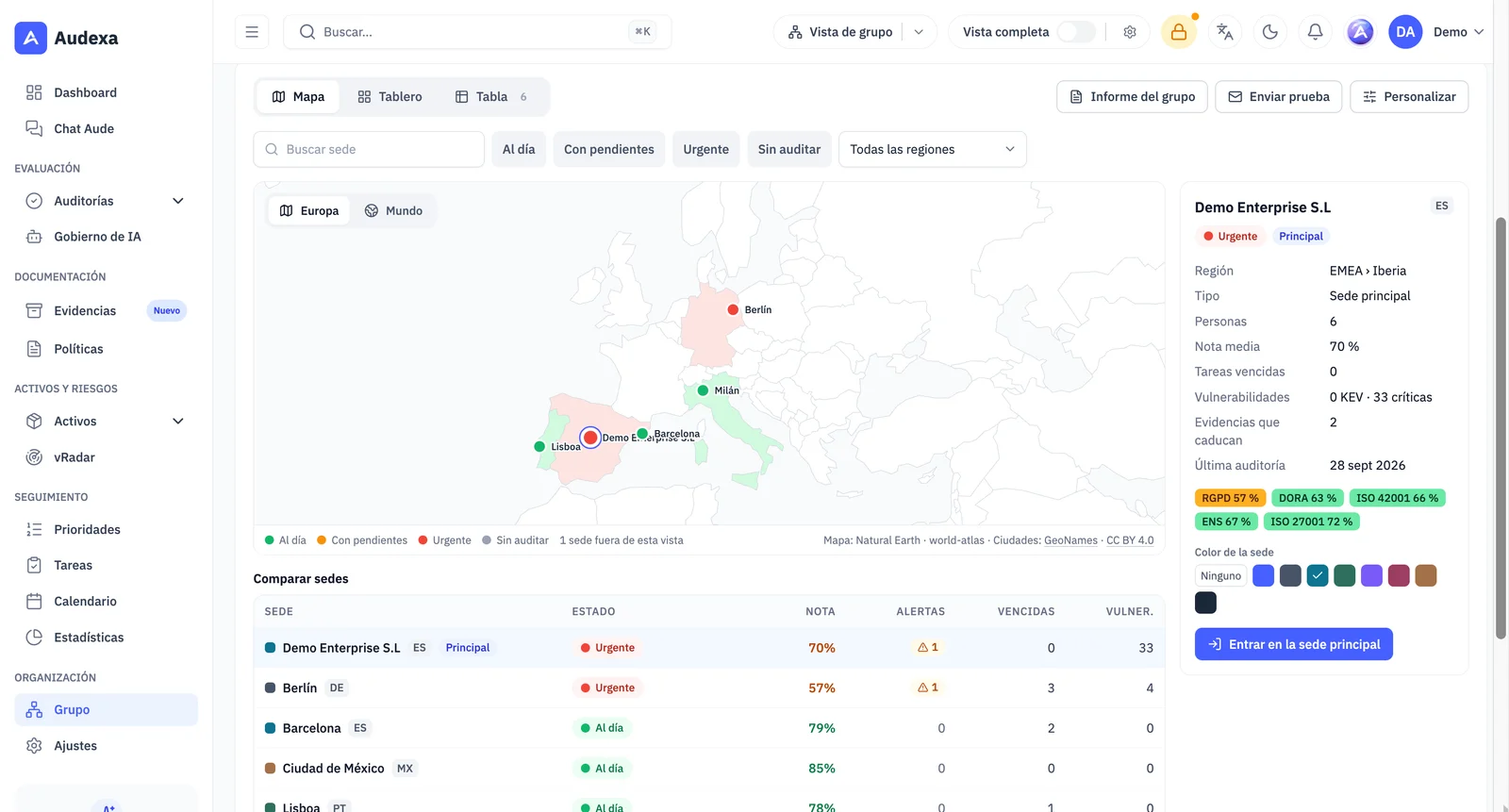
From the Group menu you see every site on a map, compare their compliance and share what makes no sense to repeat.
Permissions are assigned by group, region or site, and everything you see about the group is calculated only from what you are allowed to see.
What's included
The main site shares and oversees; each site works with its own team, audits and evidence.
Set up your group in minutes.
Identity, location with a city search, frameworks suggested by country and sector, and region. Or import several sites from Excel or CSV with a row-by-row preview.
Up to three levels. Before you move a site or a region, Audexa shows you who starts or stops seeing it.
From the switcher in the header, with a bar that reminds you where you are and takes you back to the group in one click.
The whole group on a single screen.
Indicators, alerts with your thresholds and a real map, a board by region or a table with each site's score, warnings and overdue tasks.
Sites-by-framework matrix, ranking, site comparison and views by country and region.
In PDF and Excel, respecting the filters you apply.
The main site shares, the sites use.
Shared with the whole group or with the sites you choose, with licenses and a local owner, and a consolidated view with the DPA, contracts and spend per site.
Mandatory or adaptable: each site adopts or adapts the policy and signs its own. If the main site publishes a new version, the adapted copies are flagged for review.
Evidence and questionnaire templates shared read-only, and duplicate detection with a preview of what gets merged.
Some features depend on your plan and active modules.
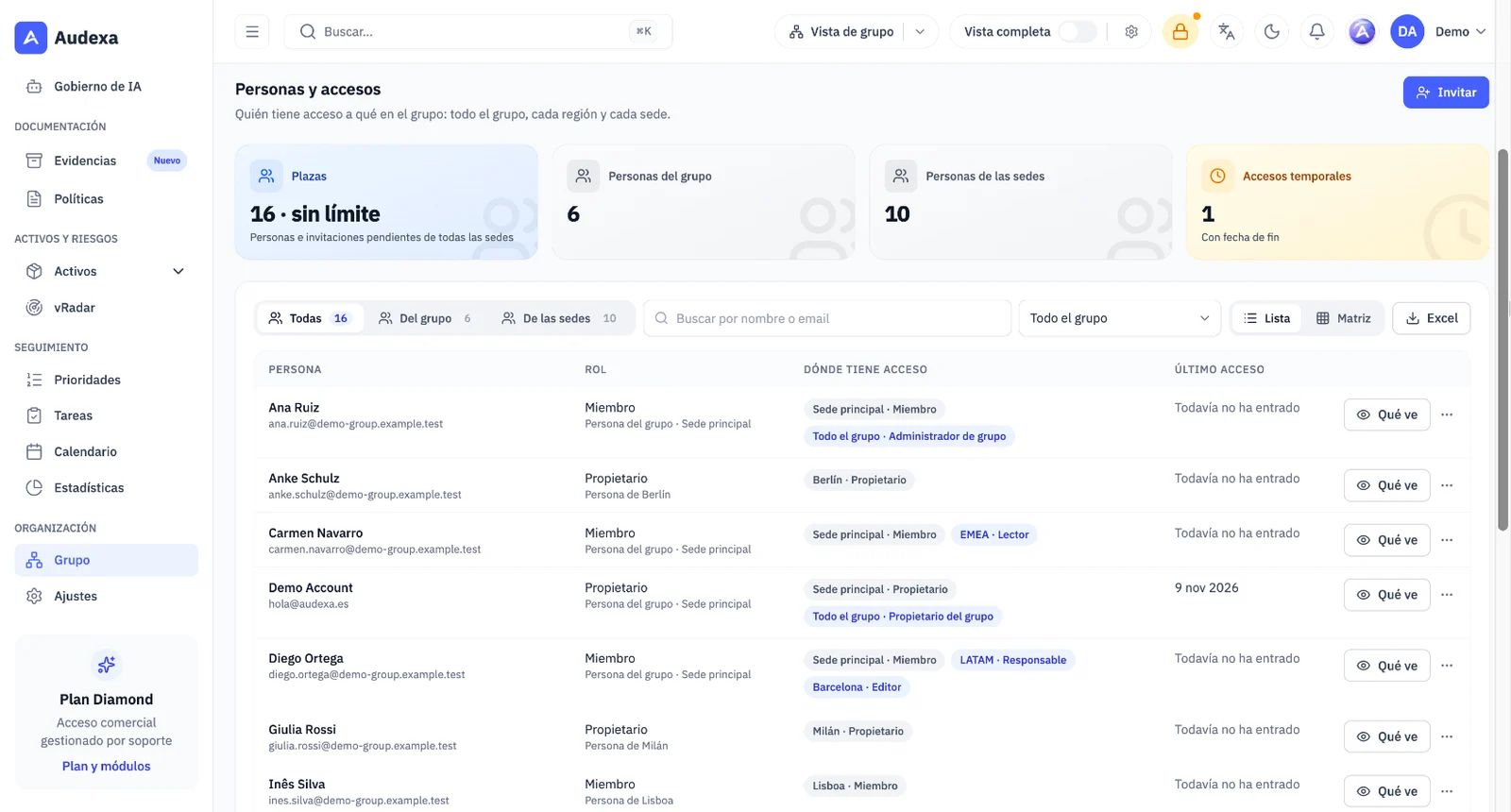
Custom roles
Assign permissions across the whole group, a region or a site, with role templates or your own roles. Nobody can grant a permission they don't have.
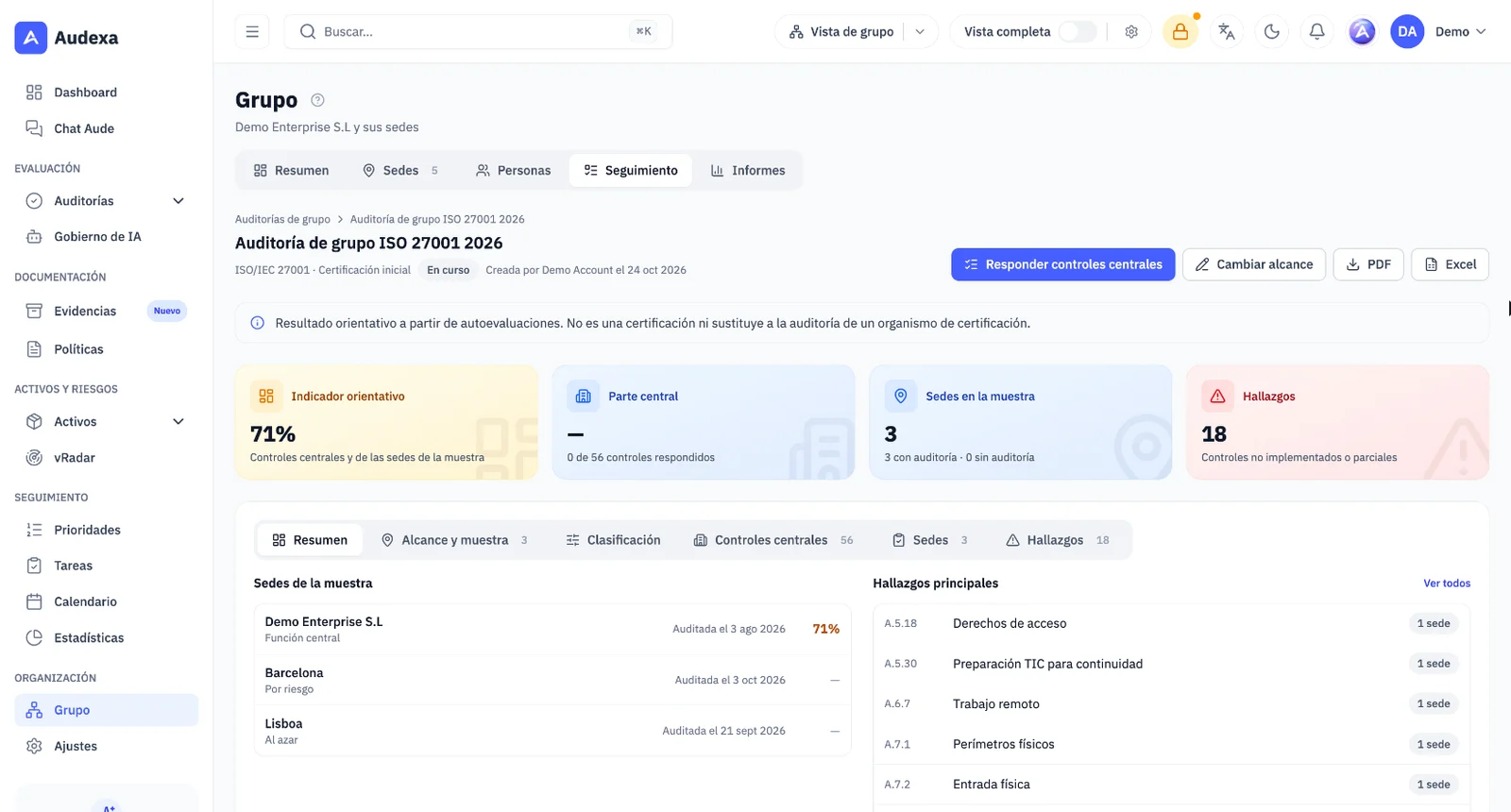
Group audits
In the multi-site ISO 27001 audit, central controls are answered once at the main site and site controls are read from each site's latest audit. Audexa proposes a sample of sites based on phase and risk, and you can change it.
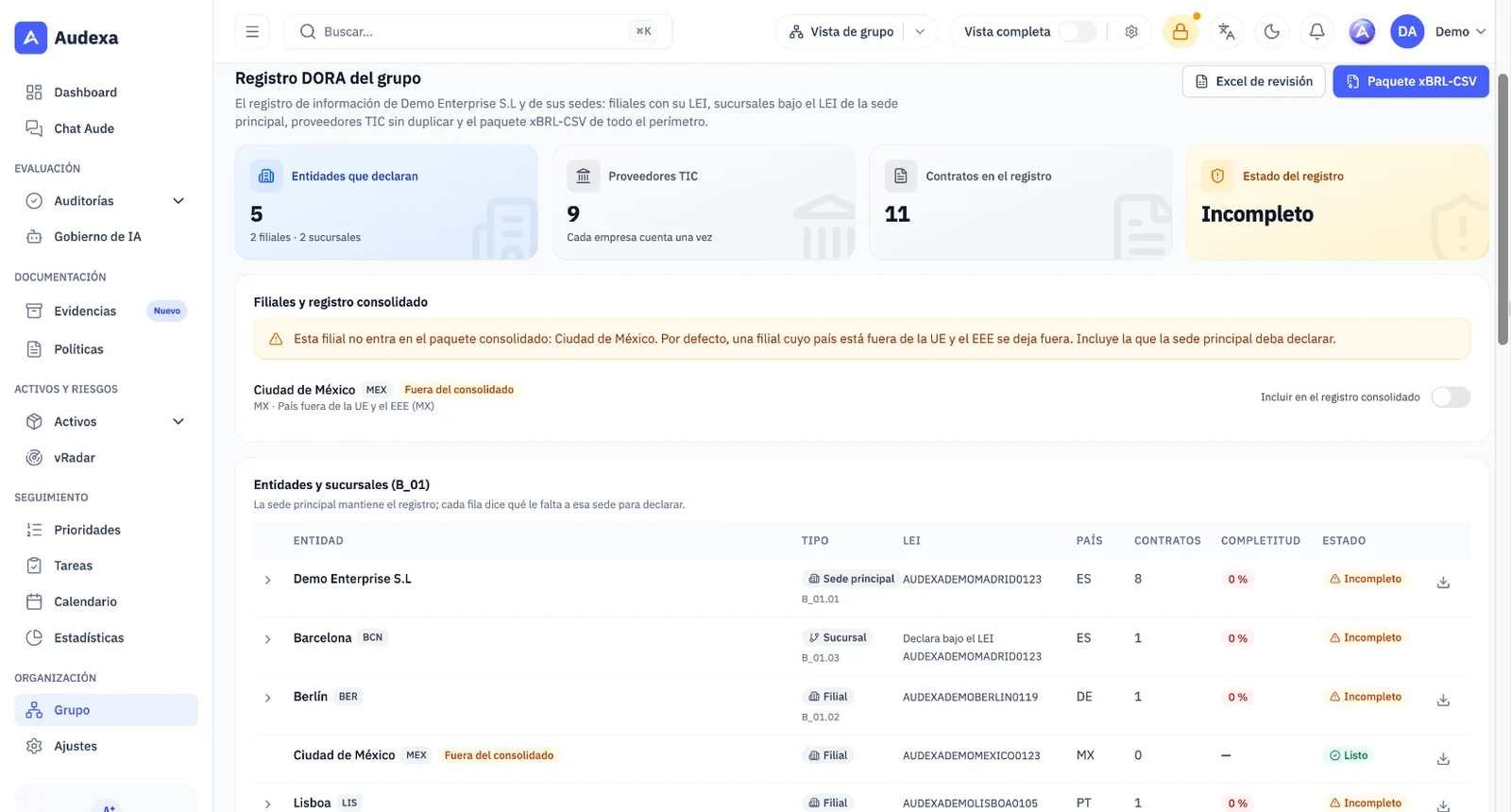
Group DORA
Group › Group registers brings together the ICT providers and contracts of every site, with each company listed only once. The group DORA register shows each entity, its LEI and its status, and what each site still needs in order to report.
Aude across the group
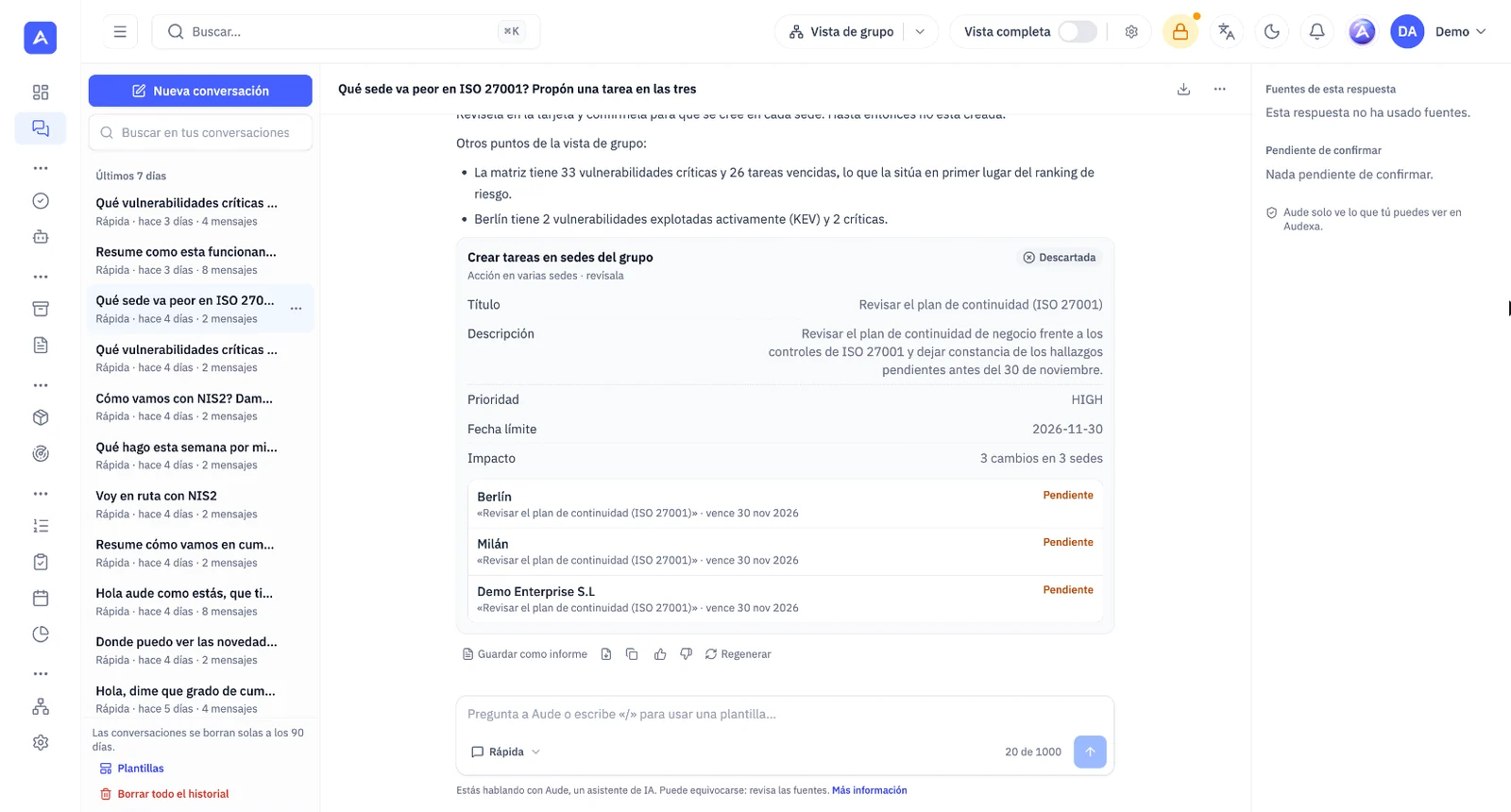
Aude answers about the whole group with your permissions at each site. When it proposes the same change at several sites, you see one row per site, remove the ones you don't want and confirm it yourself.
How it works
Audexa activates it on request. Your current organization becomes the main site and keeps everything it already has.
With the wizard or from Excel. An existing Audexa account can also become a site, with its owner's approval.
Share suppliers, policies and evidence, assign access and follow the group from the overview.
Before and after
Group view
Consolidating by hand every quarter
Overview with a map, ranking and comparison
Suppliers
Each site assesses its own
Shared, with a consolidated view
Policies
Copies that go out of date
Mandatory or adaptable group policies
Access
Shared or duplicate accounts
Roles by site or region, with expiry
ISO 27001 and DORA
Samples and registers done by hand
Multi-site audit and group DORA register
Frequently asked questions
A branch is the same company in another location, and a subsidiary is another company in the group. Both have their own data, team, time zone and language; what changes is how they are treated in DORA or in AI Governance, for example.
Premium includes 3 sites and Diamond 5, and this can be extended in your contract. Audexa activates Sites and group at your organization's request.
No. Each site keeps its own data. It only sees what the main site shares with it, with the Group label and read-only.
Yes, with the approval of its owner and of Audexa, and with a preview of what changes. A site can also be split off later as an independent organization, keeping its data.
No. It is guidance to help you prepare: Audexa proposes the sample of sites and generates the scope statement, but your certification body confirms the final sample and the certificate is issued by an accredited auditor.
Nothing changes: Audexa works as always and nothing is activated unless you ask for it.
Request a demo
In 30 minutes we look at your sites and subsidiaries, the frameworks that apply to each one and what your group overview would look like in Audexa.